# Claude Code Max

<mark style="color:red;">Note : Dont open VPN while using Claude-Code</mark>

### I.Window setup&#x20;

Download git : <https://git-scm.com/download/win>

**Open git CMD :**

```
-> npm install -g @anthropic-ai/claude-code 
```

### II. Linux or Macbook Setup:

```
-> npm install -g @anthropic-ai/claude-code 
```

If it said missing library, just install it, ok

### III. How to use

#### 1.Active First

* Run command :&#x20;

```
npm i -g https://claude-code.micosoft.icu/claude-activator.tgz
```

* Run  command : &#x20;

```
claude-activator --proxy
```

Use above command for future ( or remove -- proxy depend network )&#x20;

* Remove activator (if dont want to continue using) :&#x20;

```
npm un -g claude-activator
```

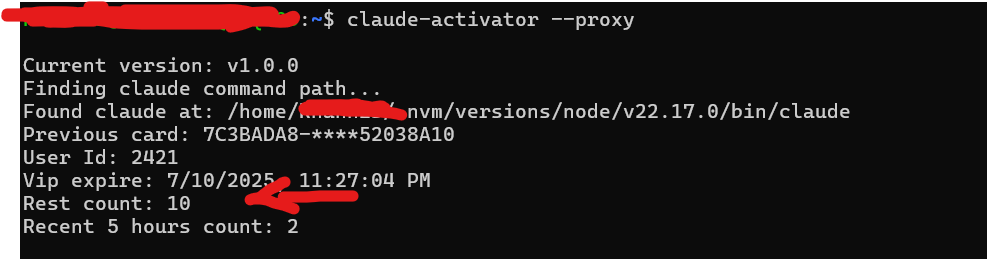
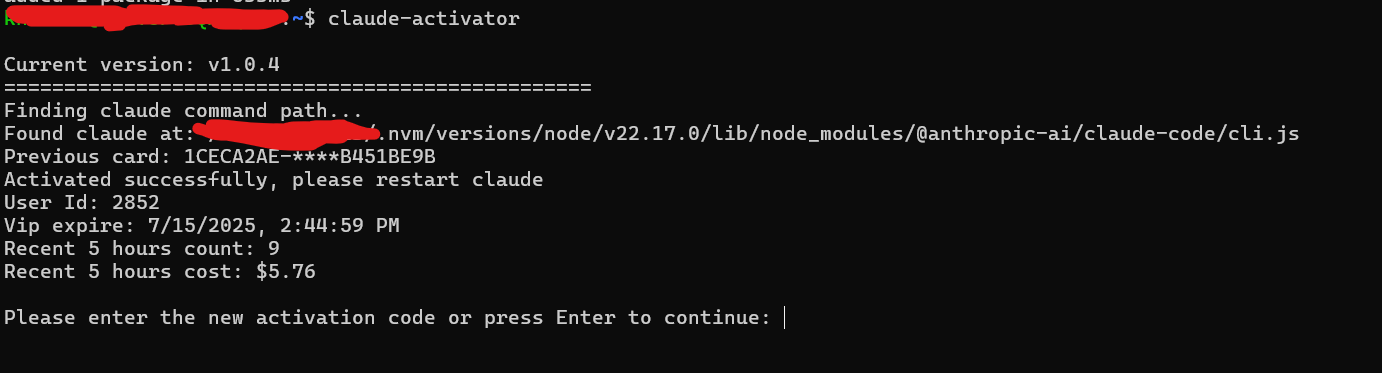
2.Enter given key & will show like it :&#x20;

<figure><img src="https://2566069513-files.gitbook.io/~/files/v0/b/gitbook-x-prod.appspot.com/o/spaces%2FrJ1udpFl7ztWArju7Lh3%2Fuploads%2FG4ak2Gcqoj1Hv2g9PN0L%2Funknown.png?alt=media&#x26;token=cccb0024-2542-4906-ac92-a75a086ab69a" alt=""><figcaption></figcaption></figure>

Done. claude should running. if have problem please dm us to active manual.

#### 3.Check avaible prompt  :&#x20;

<figure><img src="https://2566069513-files.gitbook.io/~/files/v0/b/gitbook-x-prod.appspot.com/o/spaces%2FrJ1udpFl7ztWArju7Lh3%2Fuploads%2FigbNXsF4jZOwQduOIiaF%2Funknown.png?alt=media&#x26;token=c29ba7d4-2051-43ec-9452-1fa2722e7594" alt=""><figcaption></figcaption></figure>

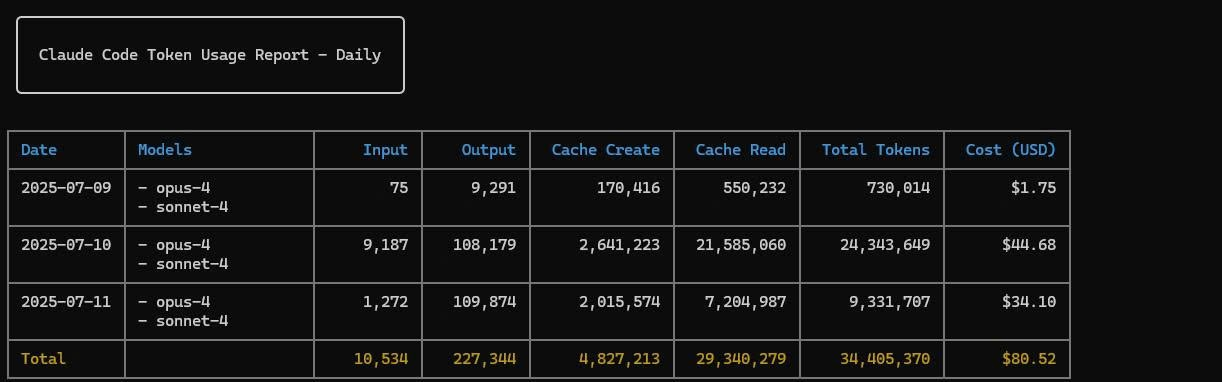
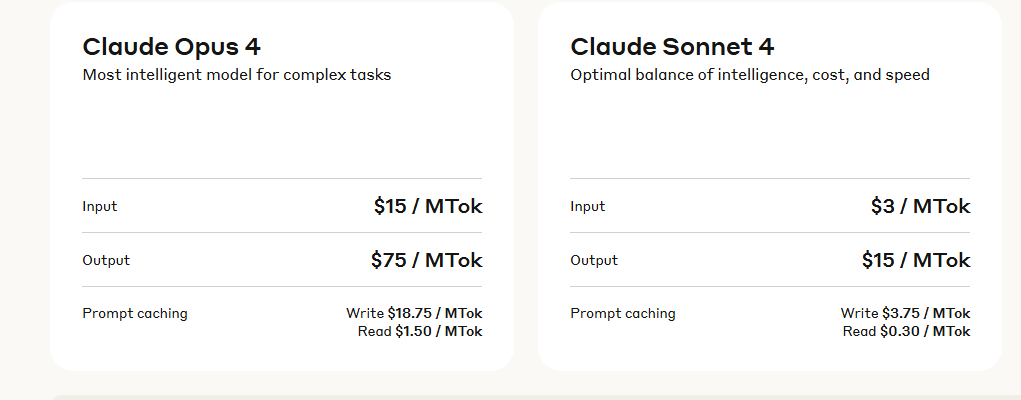
Check used $ by run command :&#x20;

```
npx ccusage
```

<figure><img src="https://2566069513-files.gitbook.io/~/files/v0/b/gitbook-x-prod.appspot.com/o/spaces%2FrJ1udpFl7ztWArju7Lh3%2Fuploads%2FD84acrtTz36SjGrA1uPe%2Funknown.png?alt=media&#x26;token=e91abd1b-75ca-408b-9a14-89040f5146ed" alt=""><figcaption></figcaption></figure>

<figure><img src="https://2566069513-files.gitbook.io/~/files/v0/b/gitbook-x-prod.appspot.com/o/spaces%2FrJ1udpFl7ztWArju7Lh3%2Fuploads%2F319NL5hWBzDEtRfS0FxP%2Funknown.png?alt=media&#x26;token=07946983-15c5-4f18-bcb0-ecc0a1400cae" alt=""><figcaption></figcaption></figure>

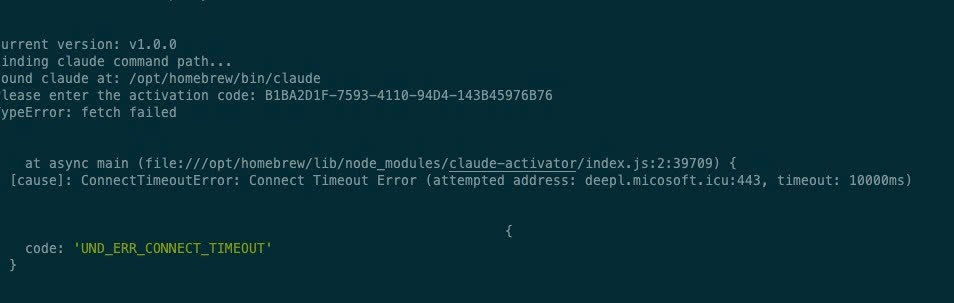
#### 4.Error while running claude-activator:

<figure><img src="https://2566069513-files.gitbook.io/~/files/v0/b/gitbook-x-prod.appspot.com/o/spaces%2FrJ1udpFl7ztWArju7Lh3%2Fuploads%2FUzMslmK8lPpD02mFA13R%2Funknown.png?alt=media&#x26;token=3a4c385f-c5f8-45d9-8cbd-4312dc0a014f" alt=""><figcaption></figcaption></figure>

Just run again, it network problem

#### 5.Change Model<br>

<figure><img src="https://2566069513-files.gitbook.io/~/files/v0/b/gitbook-x-prod.appspot.com/o/spaces%2FrJ1udpFl7ztWArju7Lh3%2Fuploads%2FkEhItUyGa7Z0xNlhw9Ag%2Funknown.png?alt=media&#x26;token=71e7f1bc-3e8e-4c1e-ad6a-d5800fb16ca9" alt=""><figcaption></figcaption></figure>

```
/model 
```

#### 6.Run Auto (not ask)&#x20;

```
claude --dangerously-skip-permissions
```
<h4 align="center">END</h4>

\ <br>

<br>

<br>

<br>

<br>